View Categories

How to create my store banner?

Situation A: I had my own banner, but how to convert it into suggested pixel? #

In the vendor store setting, store banner is suggested image dimension 625 x 300 pixel.

Here is a helpful website for you to custom your banner’s pixel which named PicResize.

Step 1: Click the ‘Browse’ to choose your own banner #

Step 2: Choose ‘Custom Size’ and key in ‘625’ for Width & ‘300’ for Height #

Step 3: Click the blue button to convert #

Step 4: Click to ‘View image’ and ‘Save to Disk’ #

Situation B: I have no idea with the banner. #

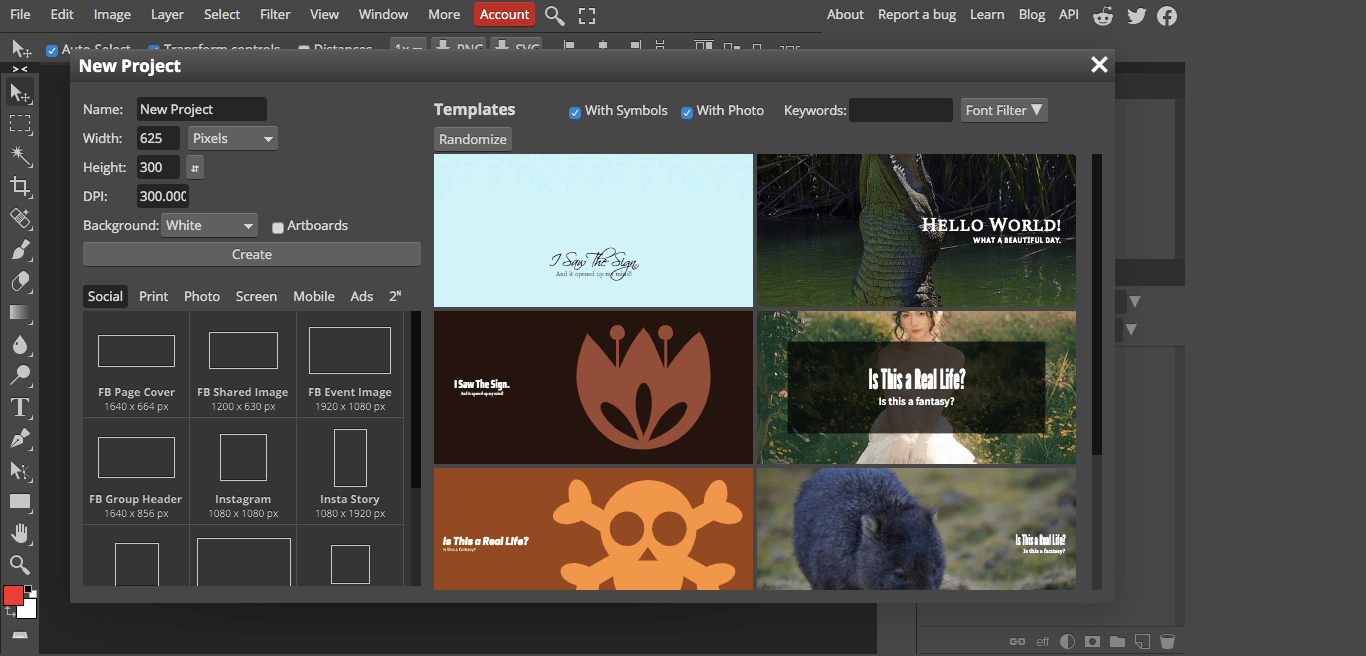
Here is a helpful website for you to create your banner which named Photopea.

Step 1: Click on ‘New Project’ #

Step 2: Change Width=625; Height=300; DPI=300 #

Step 3: Choose a template you preferred to edit #

Step 4: Click ‘File’ > ‘Export as’ > ‘PNG’ #

Step 5: Save #

Step 6: Upload your banner to your store and done it. #

I hope this article helps you.

If I can be of assistance, please do not hesitate to contact me.

WhatsApp Miss Yip +60199895206